Making it secure — HTTPS with Let's Encrypt and Cloudflare
Part 3 of the homelab series: getting a trusted HTTPS certificate for a private service that's never been on the public internet, using Let's Encrypt's DNS-01 challenge and Cloudflare.
- published
- tags
- #Traefik #Https #Tls #Lets-Encrypt #Cloudflare #Dns #Docker #Homelab #Self-Hosting
- categories
- Homelab
At the end of the last post, http://traefik.kaoshome.dev was working from anywhere on the tailnet. But the browser still showed “Not secure” and all traffic was going over plain HTTP. This post fixes that.
The end state: https://traefik.kaoshome.dev with a green padlock, on a service that has never been publicly exposed and never will be.
Why HTTPS for a private service?
HTTPS is usually framed as a public internet concern, protecting traffic from eavesdroppers between your browser and some remote server. For a private homelab only accessible through Tailscale, that argument is weaker: traffic already travels through WireGuard’s encrypted tunnel.
But there are still good reasons to set it up:
Browser trust. The “Not secure” warning isn’t just cosmetic. Browsers increasingly restrict capabilities on HTTP origins: Service Workers don’t work, the Clipboard API requires a secure context, some browser extensions behave differently on insecure pages. Switching to HTTPS removes a whole class of problems.
Credential safety. Post 2 set up basicAuth on the Traefik dashboard. With HTTP, those credentials travel in the request headers unencrypted. Even inside the Tailscale tunnel, there’s no reason to be sloppy if we can avoid it.
Good habits. Home Assistant, Portainer, any service with a login page… HTTPS should be the baseline.
It’s free and automatic. Let’s Encrypt issues trusted certificates at no cost, and Traefik handles renewal automatically. Once it’s set up, you never think about it again.
Why you need a real domain
Let’s Encrypt is a Certificate Authority. It signs certificates, and browsers trust those signatures because Let’s Encrypt is on their built-in list of trusted CAs. To get a certificate signed, Let’s Encrypt needs to verify that you actually control the domain you’re requesting a certificate for.
There are different ways it can verify this, called challenges. The most common one, the HTTP-01 challenge, works by asking you to serve a specific token at http://yourdomain/.well-known/acme-challenge/<token>. Let’s Encrypt’s servers make an HTTP request to that URL from the public internet to confirm you control the domain.
That immediately rules out our setup. Our services are private: traefik.kaoshome.dev only resolves correctly inside the tailnet, via Pi-hole. The public internet has no idea that address exists. Let’s Encrypt’s servers can’t reach it, so the HTTP-01 challenge can’t work.
There’s another challenge type: DNS-01. Instead of serving a file over HTTP, it asks you to create a specific TXT record in your domain’s public DNS. Let’s Encrypt queries public DNS to find it. No HTTP request required, no need for the service to be publicly reachable.
This is the elegant trick: Let’s Encrypt validates ownership through Cloudflare’s public DNS, issues a trusted certificate, and our service never has to be exposed to the internet. The cert is valid and browser-trusted, even though the service it protects is private.
For this to work, you need a real, publicly registered domain. The wildcard *.kaoshome.dev rule in Pi-hole only handles internal DNS - it doesn’t create any public DNS entries. Let’s Encrypt looks at public DNS, and for that you need a domain you actually own.
Buying a domain on Cloudflare
I use Cloudflare both as the DNS provider for kaoshome.dev and as the target for Traefik’s DNS-01 automation. Cloudflare has an API that lets Traefik create and delete the required TXT records on your behalf. Traefik has a built-in Cloudflare DNS challenge provider, so the integration is straightforward.
One thing to know about .dev domains: browsers enforce HTTPS for them by default via
HSTS preloading
. If you navigate to http://anything.kaoshome.dev, the browser will silently upgrade it to HTTPS before even making a request. For my purposes, this is a feature, not a problem — I’m setting up HTTPS anyway. But it’s good to know so you’re not surprised when HTTP requests get redirected.
Register the domain through the Cloudflare dashboard. Once it’s registered, Cloudflare automatically becomes the authoritative nameserver.
Creating a Cloudflare API token
Traefik needs API access to Cloudflare to manage DNS records during certificate issuance. In the Cloudflare dashboard, go to My Profile → API Tokens → Create Token and use the Edit zone DNS template.
Under Permissions, you need two:
Zone → DNS → Edit— to create and delete TXT recordsZone → Zone → Read— to look up zone information
Under Zone Resources, select your specific domain. Restricting the token to one zone is good practice. Save and copy the token.
Updating Traefik
The HTTP-only Traefik setup from post 2 needs a few additions. Here’s the full docker-compose.yaml:
services:
  traefik:
    image: traefik:v3.6
    container_name: traefik
    restart: unless-stopped
    security_opt:
      - no-new-privileges:true
    command:
      # EntryPoints
      - '--entrypoints.websecure.address=:443'
      - '--entrypoints.web.http.redirections.entrypoint.to=websecure'
      - '--entrypoints.web.http.redirections.entrypoint.scheme=https'

      # Providers
      - '--providers.docker=false'
      - '--providers.file.directory=/dynamic'
      - '--providers.file.watch=true'

      # API & Dashboard
      - '--api.dashboard=true'

      # Observability
      - '--log.level=INFO'
      - '--accesslog=true'

      # TLS
      - '--certificatesresolvers.le.acme.email=${CF_EMAIL}'
      - '--certificatesresolvers.le.acme.storage=/letsencrypt/acme.json'
      - '--certificatesresolvers.le.acme.dnschallenge=true'
      - '--certificatesresolvers.le.acme.dnschallenge.provider=cloudflare'

      # Optionally use the staging server to avoid exhausting rate limits during testing
      # - "--certificatesresolvers.le.acme.caserver=https://acme-staging-v02.api.letsencrypt.org/directory"
    environment:
      - CLOUDFLARE_DNS_API_TOKEN=${CF_DNS_API_TOKEN}
      - CF_ZONE_API_TOKEN=${CF_DNS_API_TOKEN}
    ports:
      - '443:443'
    volumes:
      - ./letsencrypt:/letsencrypt
      - ./dynamic:/dynamic
    networks:
      - traefik

networks:
  traefik:
    name: traefik
    driver: bridge
A few things worth calling out:
Port 80 is gone. In post 2, Traefik listened on port 80. Now all traffic goes to port 443. But I kept the web entrypoint configured — just without a port binding. Its only job now is to redirect HTTP to HTTPS via --entrypoints.web.http.redirections.entrypoint.to=websecure. Any request that somehow arrives on port 80 gets upgraded. In my case, since .dev domains enforce HTTPS at the browser level, this redirect will rarely fire in practice, however I have it here in case I ever add a non-.dev subdomain.
certificatesresolvers.le defines a certificate resolver named le. The name is arbitrary, I’ll reference it later in the dynamic config. The ACME settings tell Traefik to use the DNS-01 challenge with Cloudflare and to store certificates in /letsencrypt/acme.json.
Two Cloudflare token variables. The environment section sets both CLOUDFLARE_DNS_API_TOKEN and CF_ZONE_API_TOKEN to the same value. This is because different versions of the Cloudflare provider look for different variable names. Setting both guarantees it works regardless of version.
${CF_EMAIL} and ${CF_DNS_API_TOKEN} are environment variables read from a .env file next to the docker-compose.yaml. Create one with:
[email protected]
CF_DNS_API_TOKEN=your-cloudflare-api-token
Remember to add .env to .gitignore.
Setting up the certificate storage file
Before starting the container, create the file where Traefik will store certificates:
mkdir letsencrypt
touch letsencrypt/acme.json
chmod 600 letsencrypt/acme.json
The permissions matter! Traefik requires that acme.json is only readable by its owner (600). If the permissions are wrong, the ACME flow fails silently. Traefik starts fine, no error in the logs, but no certificate is ever issued.
Staging first: avoid rate limits
Let’s Encrypt has strict rate limits on its production server: 5 failed validation attempts per domain per hour, and 50 certificates per domain per week. If you misconfigure something and Traefik hammers the production server trying to recover, you can burn through your allowance quickly and get temporarily blocked.
Let’s Encrypt provides a staging server with much more relaxed limits meant exactly for testing. Staging certificates are not trusted by browsers (you’ll get a different warning instead of “Not secure”), but they prove that the whole flow works before switching to production.
To use it, uncomment this line in the docker-compose.yaml:
- "--certificatesresolvers.le.acme.caserver=https://acme-staging-v02.api.letsencrypt.org/directory"
Start Traefik and watch the logs:
docker compose up
In the output, you should see Traefik requesting a certificate, calling the Cloudflare API, and eventually storing the cert. If you see "certificate obtained successfully" — the flow works. Once confirmed, stop the container, delete letsencrypt/acme.json (so Traefik starts fresh), comment the staging line back out and restart. This time it will issue a real, trusted certificate.
Updating the dynamic config
The routing config from post 2 pointed to the web (HTTP) entrypoint. Swap it to websecure and add TLS. Here’s the updated dynamic/traefik-dashboard.yml:
http:
  middlewares:
    dashboard-auth:
      basicAuth:
        users:
          - "admin:<hashed-password>"

  routers:
    traefik-dashboard:
      rule: "Host(`traefik.kaoshome.dev`)"
      entryPoints:
        - websecure
      tls:
        certResolver: le
      service: api@internal
      middlewares:
        - dashboard-auth
Two changes from the HTTP version:
entryPoints: [websecure]— this router now only applies to HTTPS traffic on port 443tls.certResolver: le— tells Traefik to use theleresolver to obtain a certificate for this router’s domain
The certResolver: le reference is what triggers certificate issuance. When Traefik sees a router with this field, it checks acme.json for a matching certificate. If none exists yet, it starts the ACME flow.
Every service you add behind Traefik gets tls.certResolver: le in its router definition. Traefik handles the rest, including wildcard certificates that cover all subdomains at once, but that post is coming later.
How it all connects
Two distinct flows are at play here. The first happens once (and then again automatically every 90 days):
Traefik needs a certificate for *.kaoshome.dev
  → calls Cloudflare API
  → creates TXT record: _acme-challenge.kaoshome.dev = "<token>"

Let's Encrypt queries public DNS
  → finds the TXT record
  → validates domain ownership
  → issues and signs the certificate

Traefik stores the certificate in acme.json
  → deletes the TXT record from Cloudflare
The second is what happens on every normal request afterwards:
Browser asks: "what's the IP of traefik.kaoshome.dev?"
  → Pi-hole answers: 100.x.x.x (the Pi's Tailscale IP)

Browser sends HTTPS request to 100.x.x.x:443, Host: traefik.kaoshome.dev
  → Tailscale delivers the packet to the Pi over the encrypted tunnel

Traefik is listening on port 443
  → TLS handshake using the cert stored in acme.json
  → reads Host: traefik.kaoshome.dev
  → finds a matching router
  → applies the dashboard-auth middleware
  → forwards to api@internal

Dashboard responds over an encrypted connection
Cloudflare and Let’s Encrypt are completely absent from the second flow. They were only needed at certificate issuance time. Normal traffic goes: Pi-hole → Tailscale → Traefik → container.
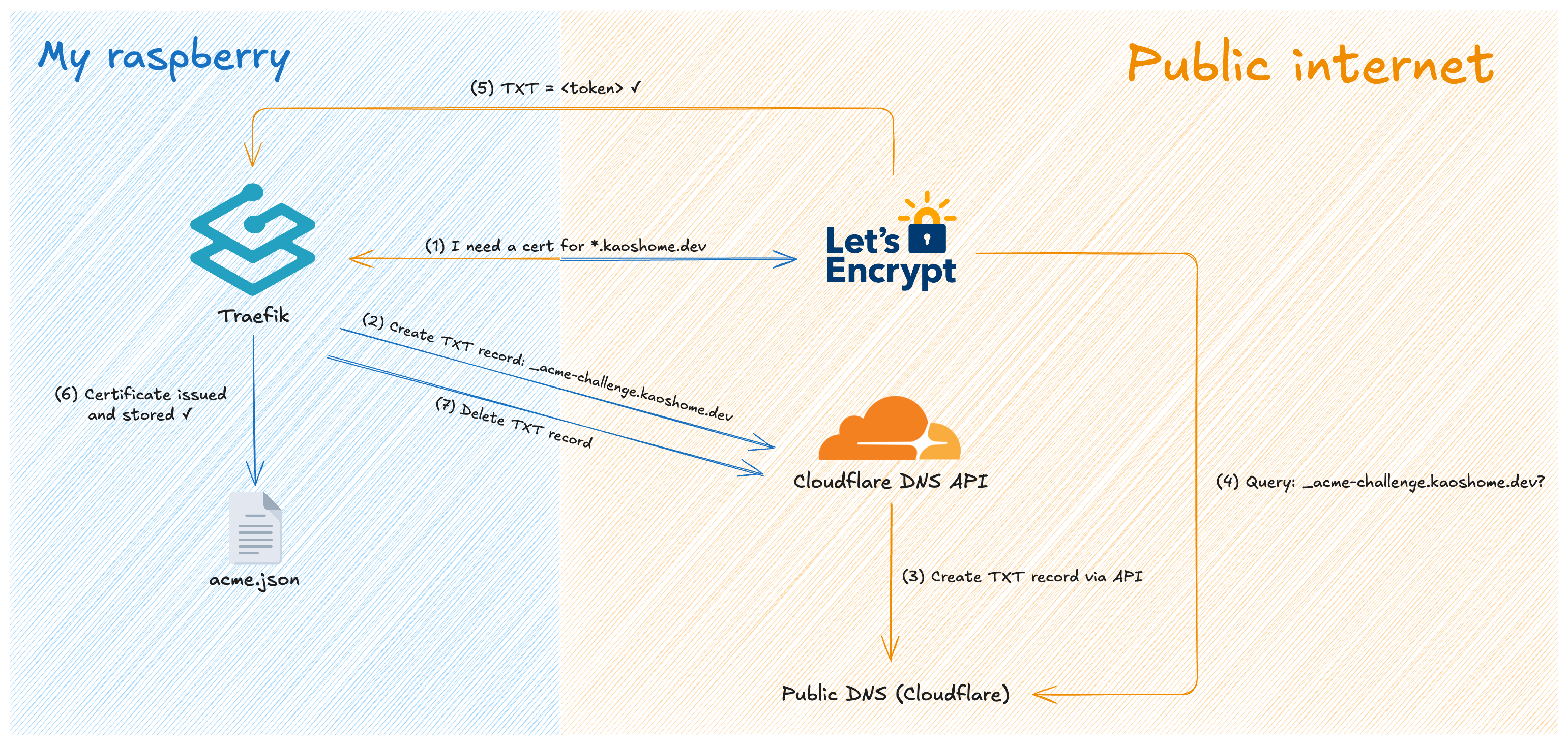
The certificate issuance flow. This happens once and then repeats automatically before expiry.
Where we are
With HTTPS in place:
https://traefik.kaoshome.devserves a valid, browser-trusted certificate- All HTTP traffic is automatically redirected to HTTPS
- Traefik handles certificate renewal automatically — certificates expire after 90 days, but Traefik renews them at the 60-day mark without any intervention
- Every new service added behind Traefik gets HTTPS for free by adding
tls.certResolver: leto its router
The infrastructure is now stable. DNS resolves, traffic routes, connections are encrypted and trusted. In the next post, I’ll start adding real services behind Traefik such as Portainer for container management, Homeassistant for home automation and more.